You open your phone, type simpletopicguide.com into your browser, and hit “Enter.” In less than a blink of an eye, a beautifully formatted webpage loads onto your screen. It feels completely effortless, almost like magic. But what actually happened in that tiny fraction of a second between your finger tapping the screen and the page appearing?
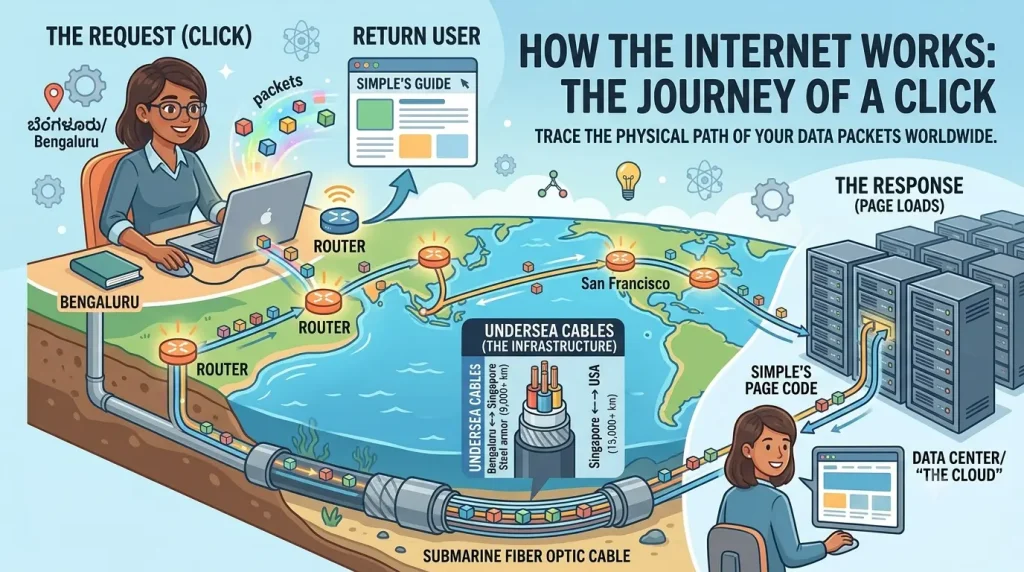
The reality behind that split-second click is a mind-boggling, lightning-fast journey that spans the globe. Your request didn’t just vanish into thin air; it kicked off a physical relay race that traveled down the wires of your home, raced through underground cables, sped across massive fiber-optic lines resting at the dark bottom of the world’s oceans, and blasted into a specialized data warehouse halfway across the planet before racing all the way back to you.
Many of us are taught to view the internet as “the cloud”—a mysterious, invisible mist floating in the sky. In truth, the internet is far more fascinating: it is the largest physical machine ever constructed by humanity, consisting of millions of computers connected by hundreds of thousands of miles of incredibly long cables. In this guide, we are going to strip away the confusing tech jargon and trace the exact, step-by-step physical journey your data takes every single time you click a link.
The Three Main Characters of the Web
Before we follow the journey of your click, it helps to understand the three essential components that make the web function. Think of the internet as a massive global postal network, where every player has a very specific role:
- The Client (Your Device): Think of this as your personal house. The client is any device that requests information from the web—whether it’s the smartphone in your hand, a laptop on your desk, or a smart TV in your living room.
- The Server (The Data Library): This is a powerful, specialized computer located in a distant facility that stays turned on 24/7. Its sole job is to “serve” files, images, and text to anyone who asks for them. Your website lives on a server.
- The IP Address (The Mailing Address): Just like your physical house needs an address so the mail carrier can deliver your letters, every single device connected to the internet has a unique digital address known as an IP (Internet Protocol) address (e.g.,
192.168.1.1). Without these numbers, computers would have no idea where to route data.
The Journey of a Click: Step-by-Step
To understand how a webpage loads, we have to look past our screens and trace the data’s journey through the global network infrastructure. Here is exactly what happens behind the scenes in the blink of an eye.
1.Step 1: Asking the DNS for Directions:The Phonebook.
Computers do not understand human language or website names like simpletopicguide.com. They only communicate in strings of numbers called IP addresses. The moment you hit enter, your browser’s first job is to figure out the numbers behind the name. It reaches out to the DNS (Domain Name System), which functions as the phonebook of the internet. The DNS instantly looks up the website name you typed and returns the exact numeric IP address of the server where that website lives.
2.Step 2: Breaking Into Packets:The Road Trip.
Now your browser knows exactly where to go, but a modern webpage is too heavy to travel across the world as one single, massive file. To solve this, your request—and the website’s response—is chopped up into thousands of tiny, bite-sized digital envelopes called data packets. Each packet contains only a small snippet of the website’s text, layout code, or image pixels. Every packet is stamped with a digital label containing its destination address, its return address, and an index number so your computer knows how to reassemble them later.
3.Step 3: Traveling Through Wires:The Highway.
These packets leave your device, pass through your home router, and enter the physical world. They are converted into pulses of electricity or flashes of light, traveling through copper telephone lines, fiber-optic cables running beneath your local streets, and massive undersea cables laid along the pitch-black ocean floor. As they travel at the speed of light, they pass through specialized traffic-director computers called routers. Routers read the label on each packet and instantly steer it along the fastest, least congested physical path toward its destination server.
4.Step 4: Reassembly at the Destination:The Puzzle.
Because the internet is a dynamic network, these packets do not all travel together. They take different routes to avoid digital traffic jams, meaning they arrive at your device slightly out of order. Your browser acts like a master puzzle solver: it catches the incoming envelopes, reads their index numbers, and pieces the data back together exactly as intended. Within a fraction of a second, the raw code is translated into the clean, readable text and images you see on your screen.
Demystifying “The Cloud”: It’s Closer Than You Think
When we save a photo, backup our phones, or stream a video, we are told it is happening in “the cloud.” This marketing term creates a beautiful mental image of our data floating effortlessly through the sky, completely untethered from the physical world.
The reality is far less mystical, but infinitely more impressive: the cloud is simply someone else’s computer. When you upload a file to the cloud, it travels through the exact same network of physical wires and routers described above. Its ultimate destination is a hard drive inside a giant, windowless, hyper-cooled warehouse known as a data center. These facilities—owned by tech giants like Google, Amazon, and Microsoft—house tens of thousands of powerful computers stacked from floor to ceiling.
Understanding this physical reality changes how we view technology. It means internet speed isn’t determined by magic; it’s determined by the physical distance data has to travel through wires and the efficiency of the routers processing it. It also underscores the importance of digital privacy: because your data lives on a physical computer somewhere else in the world, securing your accounts with strong passwords and encryption is vital.
Conclusion: The Ultimate Global Relay Race
The next time you open a browser and wait an extra second for a webpage or a video to load, take a brief moment to marvel at what is actually happening. You aren’t just staring at a slow screen; you are witnessing a beautifully coordinated global relay race.
A tiny digital packet just crossed continents, swam beneath an ocean, fetched a piece of information from a giant warehouse on the other side of the planet, and assembled itself perfectly in front of your eyes—all just to answer a single click of your mouse.
Your Technical Literacy Checklist
Before you hit publish, double-check that your explainer leaves readers with a clear, non-technical understanding of network basics:
- [ ] The Client: Did you clarify that the user’s phone or computer is the active requester in this journey?
- [ ] The DNS Analogy: Is the Domain Name System clearly explained as a digital phonebook translating words into numbers?
- [ ] The Packet Breakdown: Did you explain why files are broken into smaller packets to avoid clogging the network?
- [ ] The Physical Cloud: Did you successfully debunk the myth of an invisible sky network by anchoring “the cloud” to real-world data warehouses?

Shafeeq Gargal is an educator and learning enthusiast dedicated to demystifying complex concepts. With a background in technical problem solving and education, he creates clear, structured guides on personal finance, productivity, and modern technology to help readers build practical everyday skills.